


Compass
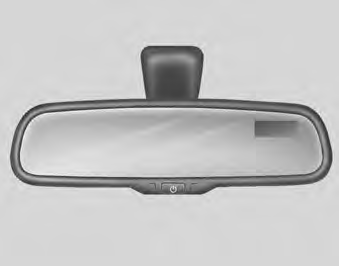
To operate compass feature The vehicle compass is a convenient feature which displays the direction the vehicle is heading.
Push the ON/OFF button (➀) on lower part of mirror to display the direction the vehicle is heading.
Pushing the ON/OFF button (➀) again will turn off the display.
Heading display (➁)
- E : East
- W :West
- S : South
- N : North
ex) NE : North East
Calibration procedure
The compass may not indicate the
correct compass direction when you
are driving in certain areas (tunnel,
parking garage, underground parking
lot, near transformer substation,
etc.), and the following may occur:
• The display read "C".
• The compass headings become inaccurate.
• The compass heading doesn't change when the vehicle changes direction.
• Some compass headings are not displayed.
• The compass headings are inaccurate in long distance driving.
The compass will automatically recalibrate itself while you drive your every day route, after the system tracks the vehicle has completed three complete circles.
If the vehicle's compass headings
become inaccurate continuously, the
compass should be manually calibrated
as follows:
1) Move the vehicle away from any
large steel structures or power
generating cables or equipment.
2) Turn on the compass by pressing the ON/OFF button.
3) Check the zone number by pressing the ON/OFF button for 6~9 seconds until the current zone number appears in the display. To re-calibrate, hold the ON/OFF button for 9~12 seconds until C is displayed.
If the zone number is different for your country, set the correct zone number referring to "Setting the compass zone" and perform the "Calibration procedure" again.
4) Make sure the vehicle windshield wipers are turned off.
5) Drive your vehicle in at least 2 complete (either clockwise or counter-clockwise) circles at less than 8 km/h (5 mph) until the compass heading appears. Driving in a circle in right-handed direction and opposite direction is possible and if possible, stop the wiper operation.
6) If the vehicle's compass headings become inaccurate again, repeat steps 1 through 6 above.
NOTICE
If new vehicle is first driven or if the
battery has been disconnected, do
the calibration procedure as above.
Setting the compass zone
This compass must be set to compensate
for the variation between
true north and magnetic north. To set
variation:
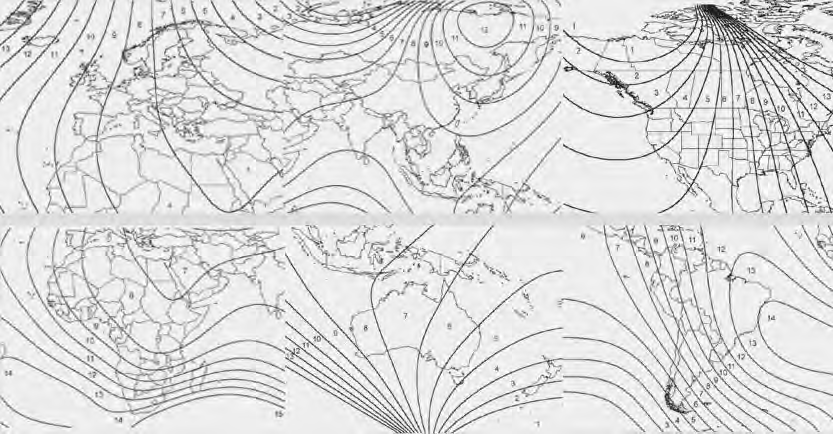
1. Find your current location and
variance zone number on the zone
map.
2. Press and hold the ON/OFF button for 6~9 seconds. The current zone number will appear in the display.
3. Release and press the ON/OFF button until the new zone number appears in the display. After you stop pressing the button in, the display will show a compass direction within a few seconds.
NOTICE
1. Do not install a ski rack, antenna,
etc. that are attached to the vehicle
using a magnet as anything
attached to the roof of the vehicle
with a magnet will effect compass
operation.
2. If the compass deviates from the correct indication soon after repeated adjustment, have the compass checked at an authorized dealer.
3. The compass may not indicate the correct compass point in tunnels or while driving up or down a steep hill.
(The compass returns to the correct compass point when the vehicle moves to an area where the geomagnetism is stabilized.)
See also:
Multiple choices for wheels - all with Michelin tyres
Maintaining a policy adopted early in the original car's evolution, Kia
continued to develop the new Kia cee'd chassis and running gear using Michelin
tyres exclusively, so that its engineers coul ...
�втомобильна� промышленно�ть Европы и �зии
По�ле первой мировой войны автомобиле�троение в Японии в о�новном было зан�то копированием американ�ких об ...
Door locks
Operating door locks from outside
the vehicle
• Turn the key toward rear of vehicle to
unlock and toward front of vehicle to
lock.
• If you lock the driver’s door with a key,
all vehicle ...